Python Variable Names and Naming Rules is a Python tutorial to explain the rules and importance of choosng good names for your variables in a program.
Choose Short but Meaningful Variable Names
Python Variable names shoud be short but meaningful. It will add in program readability. For example, ‘num’ is a better variable name than ‘n’. Because it is more descriptive and meaningful. We can easily understand that the variable ‘num’ will store a number like 10, 100 or 10.56 etc.
Python Variable Names and Naming Rules
Here are some important rules about variable names in Python:
- You can use letters, numbers and underscore for writing variable names in Python. For example, num, sum, first_name, last_name, pay, emp_name, num1, num2 etc are valid Python variable names. [Note:] you may use upper case letters in variable names, but writing names in lower letters and using underscore between two words, if needed, is a prferred naming convention in Python, as described by Python.org documentation.
- A variable name must start with a letter or underscore. Preferably, you should start a variable name with letter, it is easy to read and write. For example pay is better than _pay. Use an underscore to combine two words in the variable name, like first_name and emp_pay.
- A python variable name cannot start with a number. For exampe, 9pay and 2count is invalid variable name. But pay9 and count1 are valid variable names in Python.
- Variable Names are case-sensitive. It means that pay, PAY and Pay are three different variable names.
- Whitespace is not allowed in a variable name. Therefore, if we write ‘first name’ ,it will be an invalid variable name. Whereas, using an _ character between two words makes it a valid variable name. Therefore, first_name is a valid variable name.
- Special characters are not allowed in a variable name. For example pay@ is invalid variable name.
- Reserved words are not allowed as variable names. For example for is inavalid variable name, beacause for is a reserved word in Python. It represents a loop.
Some Common Errors While Using Variable Names in Python Scripts
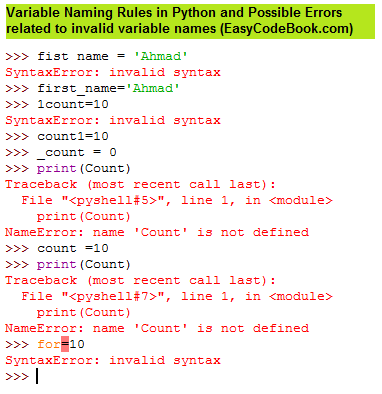
If we type a variable name with space in it, python will generate a syntax error message as shown below:
>> first name = ‘Ahmad’
SyntaxError: invalid syntax
>>>
Python has no objection, if we use an underscore, like:
>> first_name = ‘Ahmad’
>>>
If we start a variable name with a digit, Python will show:
>> 1count=10
SyntaxError: invalid syntax
If we assign a value 10 to a variable num. Then we write print(Count), Python will show a NameError. Since there is a difference between count and Count – variable names are case-sensitive.
>> count =10
>>> print(Count)
Traceback (most recent call last):
File “<pyshell#7>”, line 1, in <module>
print(Count)
NameError: name ‘Count’ is not defined
>>>
If we us a keyword as variable name, Python will show an error message:
>> for=10
SyntaxError: invalid syntax
>>>
If we use a special character like @:
> pay@ = 40000
SyntaxError: invalid syntax
>>>
If we use a reserved word like for:
>> for=10
SyntaxError: invalid syntax

There is certainly a lot to find out about this subject. I love all of the points you ave made.